Meet Guruva — Inspired by a Character from Kantara
Before we get into the architecture, there's a name worth explaining. The client named this AI Guruva — inspired by the revered teacher character from the Indian blockbuster film Kantara. A guru who shows you the path without walking it for you. That one word set the entire design philosophy: this wasn't supposed to be a search engine with a chat interface. It was supposed to feel like a knowledgeable mentor who genuinely helps students figure out who they want to become.
That's the kind of brief that makes engineers think harder.
The Real Challenge Wasn't the AI — It Was the Data
The client came to us with a career guidance platform covering 400+ job roles for students. They had the content — more than 2,500 pages of structured career information. What they didn't have was any way to make it intelligently searchable at scale.
Their first ask was simple: "build us a chatbot connected to our Google Docs." We looked at the data and said no. Not because it couldn't be done, but because it would fail. A naive chatbot plugged into a flat document store doesn't understand nuance. Ask it "what should I do after 12th if I love biology but hate blood?" and it returns irrelevant noise. At 2 lakh daily student queries, that's not a minor inconvenience — it's a broken product.
The only right answer here was a Retrieval-Augmented Generation (RAG) pipeline backed by a proper vector database. So that's exactly what we built.
Why We Self-Hosted Everything
With 2,00,000+ student queries expected every day, third-party managed vector services would have created two problems: unpredictable costs at scale, and student data flowing through external servers with no control. We self-hosted both the orchestration layer and the vector store on the client's own infrastructure.
- n8n — self-hosted for workflow orchestration, handling the full query pipeline from student input to AI response
- Qdrant — self-hosted vector database to store and search semantic embeddings of all 400+ job role documents
- Every student query gets vectorized, semantically matched against the knowledge base, and the most relevant context is injected into the LLM prompt — so Guruva always answers from verified, curated data, never from hallucination
- Zero third-party data dependencies. The client owns every byte of student interaction data
The Dashboard They Didn't Ask For (But Couldn't Live Without)
The client asked for a chatbot. We delivered a chatbot plus an intelligence dashboard — because raw AI without visibility is a black box, and business decisions shouldn't be made blind.
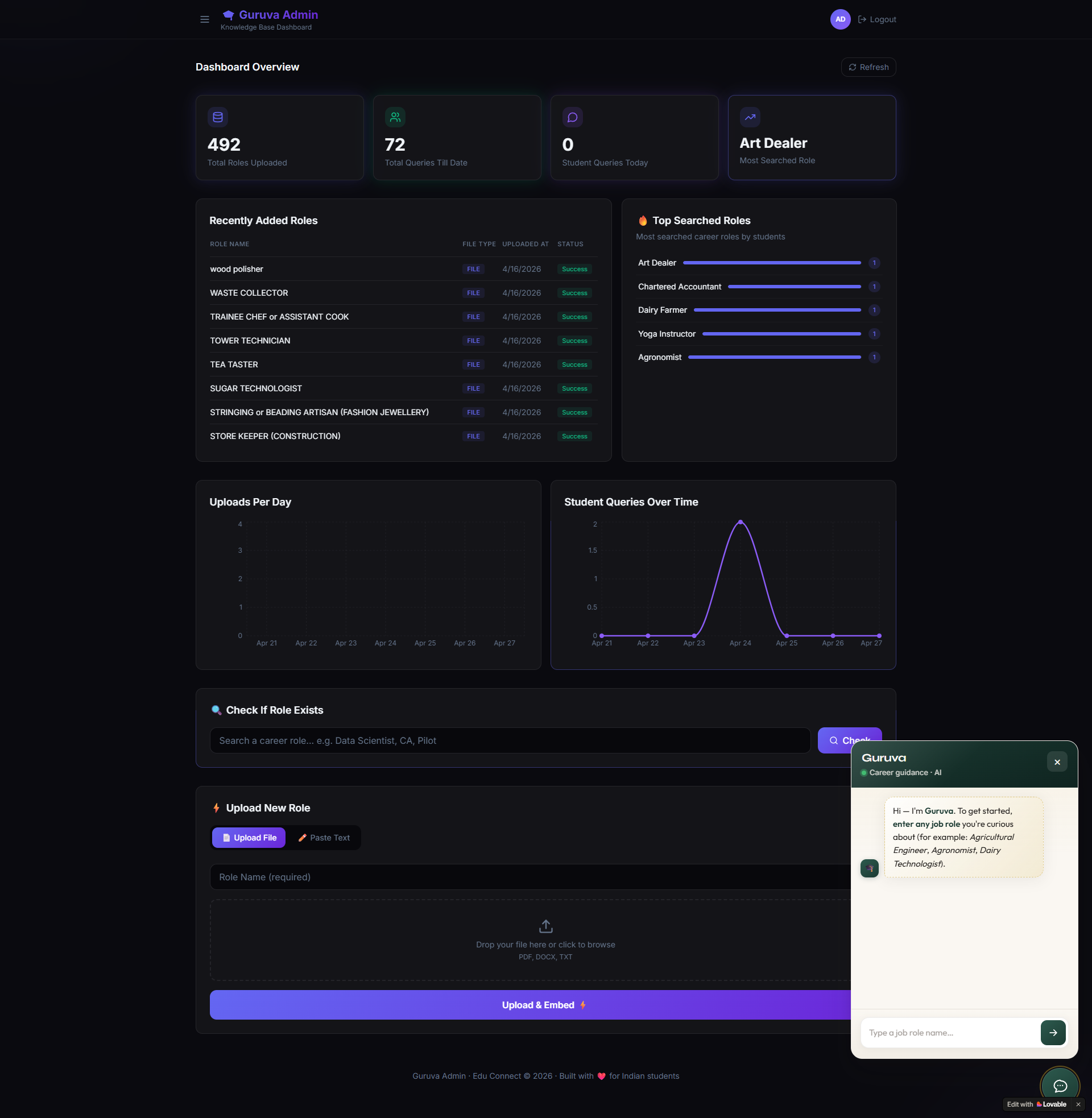
The admin dashboard gives the client's team a full command center over their platform:
- Query Analytics — total queries all-time and a daily breakdown so they know exactly how the platform is being used
- Most Searched Role — the single career role students are asking about most right now; a direct input for their content and business strategy
- Top Searched Roles List — a ranked leaderboard of career interest across their entire student base
- Student Queries Over Time — a time-series graph showing query volume trends, spikes during exam seasons, and growth over months
- Uploads Per Day — tracks how frequently new career content is being added, keeping the knowledge base momentum visible
This analytics layer alone changed how the client makes decisions. Instead of guessing which career fields to expand, they now look at what 2 lakh students are actually asking every day.
Solving the Knowledge Base Problem: No More Data Redundancy
With 400+ job roles being managed by a team, duplicate uploads were inevitable. Upload the same "Data Scientist" role twice with slightly different filenames and Guruva starts giving inconsistent answers. We solved this with a Job Role File Management system inside the dashboard.
- Before uploading, team members can search by role name to instantly check if it already exists in the Qdrant database
- Two upload modes: upload a PDF directly, or paste content into a text editor — both get chunked, embedded, and stored in Qdrant automatically
- The system prevents accidental duplication and keeps the vector store clean, which directly improves answer accuracy
- No developer intervention needed. The content team manages their own knowledge base end-to-end
The Scale It Was Built For
This platform wasn't designed for hundreds of students. It was designed for 2 lakh students every single day. That changes every architectural decision — from how vectors are indexed in Qdrant, to how n8n workflows are structured to handle burst traffic, to how the dashboard aggregates analytics without slowing down the query pipeline.
Most chatbots collapse under that kind of load because they're built as demos and scaled as an afterthought. Guruva was engineered for that number from day one.
"We expected a chatbot. CodeSquad came back with a full platform — the vector database, the dashboard, the analytics, the file management system. They understood our actual problem, not just the brief we gave them. Guruva now feels exactly like the knowledgeable guide we imagined."— Founder, EduConnect (GuruVa AI)
What Made This Project Different
Most AI projects fail not because the AI is bad, but because the data architecture underneath it is lazy. Plugging an LLM into a flat document and calling it a chatbot works fine in a demo. It breaks in production when the corpus is 2,500 pages long and the users number in the lakhs.
Guruva works because we treated the knowledge base as a first-class engineering problem — not an afterthought. The vector embeddings, the deduplication system, the semantic retrieval pipeline, the analytics layer — every piece was designed to make the AI smarter, not just faster. That's the difference between a chatbot and a product.
Building something at scale? Let's talk about the right architecture from the start.
Start a Conversation →